

For more complex websites, Umbraco CMS developers have had to use the content tree in creative ways to implement reusable and non-routable content features. So what does that mean in practice?
Reusable content includes website content that should appear on more than one page, like a call to action for a newsletter signup, an alert or advertisement, a header or other visual element, etc. It can also include content used outside of web pages, like product specs used in a similar series of products.
Non-routable content is any content that is not a web page. This can include things like custom website settings, libraries of content like product data, complex picker options, et al. Many of these kinds of content are shown on web pages in one way or another, but are not themselves web pages in the technical sense.
Umbraco CMS 19 is a LTS (long-term support) release with the usual bug fixes and performance improvements, set to be released in December of 2026. One notable new addition addresses the issues with reusable and non-routable content I just described. It's a new content editor section named "Library".
The new Library area of the back office first appeared in version 18 supporting reusable content elements using a content picker. This allowed content editors to choose 1 or more reusable items as a property of another content item. For example, choosing a color scheme for a page header.
Version 19 adds the use of Library items in the block editor, which is used for stacking content to build web pages, among other things. In fact, it also adds the ability to both detach Library content so changes don't affect all consumers of the item, and save a block to the Library so others can access it. This can even be used as a sort of templating system to bootstrap page content with a starter block.
One of the patterns we've used for a long time is creating a Settings node under the home page node, and under that creating a tree structure of configuration items like short codes, forms, shared blocks, organization profile, menus, 301/302 redirect mappings, domain redirects, and more. Much of this structure can be moved to the Library, and some of it (like shared blocks) can go away entirely, which is a big win!
 Settings and Global Units are now in the Library, leaving more content tree space for web pages.
Another benefit of moving these items outside the content tree is that all tree items are inherently routable, meaning, even without a template appliedm, Umbraco will still process requests to these items and try to serve them as pages, which wastes server resources and allows curious or malicious people to explore the structure of your content tree by looking at the request responses. You can code around this, as we typically do, to serve 404 (not found) pages. But it's another chore to remember which the Library solves by not routing its content.
There's usually more to the story so if you have questions or comments about this post let us know!
Do you need a new software development partner for an upcoming project? We would love to work with you! From websites and mobile apps to cloud services and custom software, we can help!

Software developers using Apple Silicon Macs who work with Microsoft SQL Server have been wrestling with how to build on their local computers for some time. The problem is that SQL Server only supports x64 processors, even in the latest editions. And that's just the start.
In the past, when Macs used Intel x64 chips, developers could run a SQL Server instance in several ways:
Use an x64 Windows machine on their local network (yuck)
Run a Docker container with the free version of Azure SQL Edge
Run SQL Server on an x64 Windows virtual machine using Parallels Desktop
Boot into x64 Windows using Boot Camp, and just work in Windows
When Apple Silicon was released, things got complicated. We were left with these options:
Use an x64 Windows machine on their local network (yuck)
Run a Docker container with the free version of Azure SQL Edge; uses Rosetta 2 to emulate x64
SQL Server would not run in a Parallels virtual machine because only Arm64 Windows 11 was supported, and no SQL Server editions would run through the Windows Prism emulation.
Boot Camp no longer exists
Apple recently added another wrinkle by deprecating Rosetta 2 in 2028. And Microsoft added a wrinkle by deprecating Azure SQL Edge in 2025. So we are left with one option:
Use an x64 Windows machine on their local network (yuck)
We now have a viable solution. It's not the perfect option. A perfect option would be a containerized version of SQL Server that was Arm64 native. But we do have the next best thing...
When Microsoft recently released SQL Server 2025, one of the things they added was support for running it on Arm-based Windows 11 using the Prism emulation layer. This meant that, although not officially supported, we could use an Arm-based Windows 11 virtual machine (using Parallels Desktop) to host the latest version of SQL Server, even Enterprise Edition!
There is an issue with the installation that causes SQL Server to only bind to a named pipe. This allows you to use it on the virtual machine using SSMS but nowhere else. But after much trial and error I discovered that TCP binding support is there, it's just not available in the SQL configuration tool where you would enable it. Some registry additions restore and enable the binding. Below is a simple PowerShell script that does this for you. Run this in an elevated PowerShell instance.
To make the server instance available to the host Mac, and devices on your local network, there are a couple additional steps.
First, set your Parallels virtual machine to use Shared Networking
Next, add 2 port forwards to the Shared networking model within the Parallels application preferences.
TCP port 1433 to 1433
UDP port 1434 to 1434
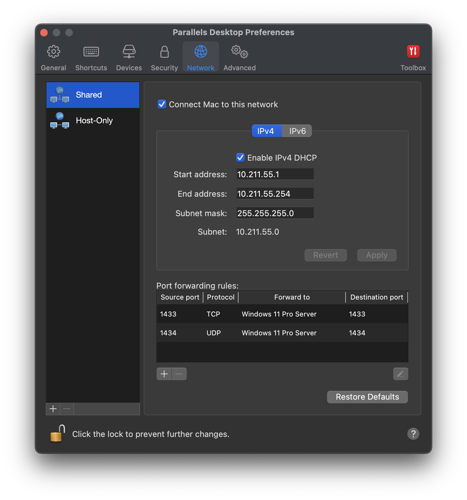
Lastly, open those two ports in the virtual machine Windows Firewall.
Once these remaining steps are complete you should be able to connect to the SQL Server instance from your host Mac, or over a network from any other device, using the host Mac's IP address. This method uses more memory than a container, but it's also better than a container because it's a native edition of SQL Server 2025 running on actual Windows. This means you get all the additional features, including the new AI and vector embeddings support, C# code compatibility, and more.
#YOUREWELCOME
There's usually more to the story so if you have questions or comments about this post let us know!
Do you need a new software development partner for an upcoming project? We would love to work with you! From websites and mobile apps to cloud services and custom software, we can help!
The latest versions of Umbraco CMS offer a set of free AI enhancements as Nuget packages, one of which is a semantic search feature. The platform already comes bundled with Lucene/Examine for a powerful keyword search using word similarity matching, so the semantic search add-on fills a contextual search gap.
When implemented, this kind of search analyzes your content using an AI embeddings model so that your searches return results based on intent, not keyword matching or word similarity. The only requirement is that you have a vector database, which is used to store and query the embeddings. This project allows you to use the Umbraco semantic search feature with Qdrant; a free and open source vector database. It's also one of the fastest.
You can see this in action right on this blog! Our blog search can be used to ask questions and will return relevant results even if the words you use aren't in the content. It does this by analyzing the content and question using AI language analysis, much like a chatbot would, to return results based on what the post text means, not simply the words it contains.
Try this question:
This should return AI data poisoning and Benford's Law as a top results, unless we added something more relevant since they were posted. Most of the question is noise words. And the remaining words are either not in the posts at all, or exist in many other posts as well. And yet it understood what you meant.
If you'd like to use the provider in your own Umbraco CMS 17+ project, add it by searching nuget for "Fynydd.Umbraco.Search.Qdrant", or find it using the button below.
If you want to check out the source code, fork and customize it, or make a pull request with new features or bug fixes, you can also find the project on Github.
There's usually more to the story so if you have questions or comments about this post let us know!
Do you need a new software development partner for an upcoming project? We would love to work with you! From websites and mobile apps to cloud services and custom software, we can help!

Umbraco CMS is a .NET content management platform used by individuals and large enterprise for everything from personal blogs to global SaaS products. It's powerful, extensible, easy to use, and open source. And it's evolving to embrace AI in ways that genuinely improve developer and content author experiences.
The new features and capabilities are foundational, based on real world needs, taking advantage of the technical opportunities large language models (LLMs) provide, targeting discreet areas in the platform. There are official Umbraco blog posts that talk about philosophy, areas of focus, primers on the individual AI technologies, and more.
The goal of this post is to provide a high-level summary of the changes and who they affect.
Umbraco is constantly evolving, most notably releasing a new major version each year just after Microsoft likewise releases a new major version of .NET. This is a blessing and a curse. On one hand, Umbraco developers get to take advantage of new .NET performance, security, and other features. But supporting a sprawling ecosystem of Umbraco versions is a challenge, especially when the breaking changes and development patterns change so frequently and vary so much between major releases.
To address this, the Umbraco CMS team has added integrations to your AI agent platform of choice. These integrations provide additional technical information about Umbraco CMS, including best practices, as well as provide controlled access to your schema and data through the official Umbraco CMS APIs.
The MCP standard allows the hosting of very specific tools that can be used by AI agents to get things done in a more simple, direct way. Umbraco supports this by providing a separate MCP host application that developers can run to give their agents deep platform and data access through the Umbraco Management API.
There are a myriad of actions that your agent can perform using these MCP extensions, including categories from site structure and user permissions, to monitoring, analytics, localization, and advanced workflows.
They allow the agent to do things with the API that would normally be done using the back office. These are actions you perform during development, like creating document types and setting permissions.
Originally a Claude Code-only feature, but now available in other AI agent platforms like OpenAI Codex, agent skills are a way to tell the AI coding environment about a given technology, which speeds development and ensures that the correct development patterns (best practices) are followed.
Umbraco is providing agent skills that will allow you to better use your AI agent of choice to build on the latest versions of Umbraco (version 17+). It's important to note that as magical as they can appear to be, there are caveats:
Not a replacement for documentation. Skills point to the documentation and teach the AI how to apply it. You should still read the Umbraco documentation.
Not scaffolding tools. They don't generate boilerplate from templates. They teach the AI to write code that fits your specific requirements.
Not perfect. Skills improve results but cannot guarantee correctness. Always review generated code.
They allow you to work with your agent to write code for things like a back office property editor for a YouTube video picker, or an notification that adds metadata to uploaded media, etc.
You can also leverage AI tools in the Umbraco platform itself, through the platform agnostic AI integration in the back office. You simply add the official Umbraco AI package, and configure the appropriate AI provider. Supported providers include:
Anthropic
AWS Bedrock
Microsoft AI Foundry
OpenAI
You finish by adding a new profile (chat or embedding), which controls the type, usage, and behavior of the AI model instance. For example, you can set the model temperature to help with determinism. Note: the profile is the vehicle through which you use the AI instance in your own code.
You can use your configured AI tool in the back office through a chat interface, to help manage content and structure, clean up data, add media metadata, and more. You can also use the configured AI instance in your application code to provide AI-driven features with pipelines and guardrails, all using the Umbraco APIs (which use the Microsoft Extensions AI package under the hood).
The official Umbraco CMS documentation on AI features can be found at the links below. Though not exhaustive, these are key resources you should check out.
Umbraco in AI — Enhancements to make building with AI smarter.
Backoffice extension agent skills — install and use the Umbraco backoffice agent skills repository with Claude Code (and other AI coding agents)
AI in Umbraco — Add AI tools and capabilities to Umbraco CMS
There's usually more to the story so if you have questions or comments about this post let us know!
Do you need a new software development partner for an upcoming project? We would love to work with you! From websites and mobile apps to cloud services and custom software, we can help!

Vector search has been around for a long time. For example, Google has been using it since the late 1990s. This powerful, almost magical technology serves as a core component of most web and app services today, including modern AI-powered search using retrieval augmented generation (RAG). It provides a low-power way to leverage AI's natural language processing to find data with semantic context.
A vector database stores data as numerical embeddings that capture the semantic meaning of text, images, or other content, and it retrieves results by finding the closest vectors using similarity search rather than exact matches. Sounds like an AI large language model (LLM) right? This makes it great for web and app content because users can search by meaning and intent, not just keywords. So synonyms and loosely related concepts still match. It also scales efficiently which is one reason large organizations like Google have used it.
A happy side effect of how these platforms work is that they're also good at handling misspellings, to a point. To really get robust handling of spelling variations, however, two strategies tend to be common:
Spell correct the actual search text before using it
Include character n-grams in your vector database entries
Character n-grams are vector embeddings (like commonly used semantic embeddings) that break text into overlapping sequences of characters, allowing vector search systems to better match terms despite typos, inflections, or spelling variations. Without these n-grams, a misspelled query like "saracha sauce" would likely return a higher score for "hot sauce" entries. But including character n-grams, a combined (fused) search would more consistently return a higher score for items with the correct spelling "sriracha sauce".
Using these n-grams can better handle searches with:
typos
missing letters
swapped letters
phonetic-ish variants
common misspellings
How does this work? At a high level, it adds a character match capability to the standard semantic search used by most vector database implementations. Here's a quick example of what happens under the hood. Take the first word in our previous example:
sriracha
3-grams: sri, rir, ira, rac, ach, cha
4-grams: srir, rira, irac, rach, acha
saracha
3-grams: sar, ara, rac, ach, cha
4-grams: sara, arac, rach, acha
Shared grams:
shared 3-grams: rac, ach, cha
shared 4-grams: rach, acha
So even though the beginning is wrong (sri vs sa), the ending chunks that carry a lot of the distinctive shape of "sriracha" survive (racha, acha, cha). And since the second word is the same, they have even more matching grams.
When these matches are fused with semantic matches, it adds weight to the correctly spelled "sriracha sauce" entry, yielding a better match set.
When it comes to including character n-grams, there are only a couple changes you need to make to a standard semantic vector database implementation:
When you generate embeddings, you also need to generate character n-gram embeddings; this is true both when you store data in the database, and when you search.
When searching, you need to execute a search both on the semantic vectors and the n-gram vectors, then fuse the results using Reciprocal Rank Fusion (RRF), which is a great way to merge disparate result sets and combine the scores.
The following samples will fill those gaps. They are written with C# for .NET, which is part of a common stack we use to build cross-platform, secure, high-performance web and mobile apps and services for our clients. We also tend to prefer the vector database Qdrant for its performance, maintainability, and open source model. So that is also referenced in the samples.
References to AiService.GenerateEmbeddingsAsync() are not covered here. Essentially it's a method to generate standard semantic embeddings. Replace that with your own (likely existing) method. And references to QdrantService.Client are merely references to a standard Qdrant client provided by the Qdrant Nuget package.
Note: Some of the code was generated by AI, but was reviewed and refactored by an actual human developer (me!).
First, you need a way to create n-grams. The CharNGramEmbedding class below will fill that gap. It allows you to generate character n-grams for a given string, and it also provides a method for fusing the semantic and n-gram search results into a single, weighted result set.
Now that you have the character n-gram generation and fusion handled, following is an example of performing a Qdrant upsert of a sample food object, including both sets of vectors.
Lastly, the following example shows how you can search the Qdrant data using both sets of vectors. Embeddings (semantic and character n-grams) for the prompt are generated and used in the search.
For the best fused results each search (semantic, n-grams) needs to return 3-5 times the number of the final result set. This is because you're trying to recover a good final top-K from two imperfect retrievers. If each retriever only returns exactly K (or close to it), you often don't have enough overlap + near misses to let fusion do its job, especially when the two methods return different items, and rank positions aren't directly comparable.
There's usually more to the story so if you have questions or comments about this post let us know!
Do you need a new software development partner for an upcoming project? We would love to work with you! From websites and mobile apps to cloud services and custom software, we can help!

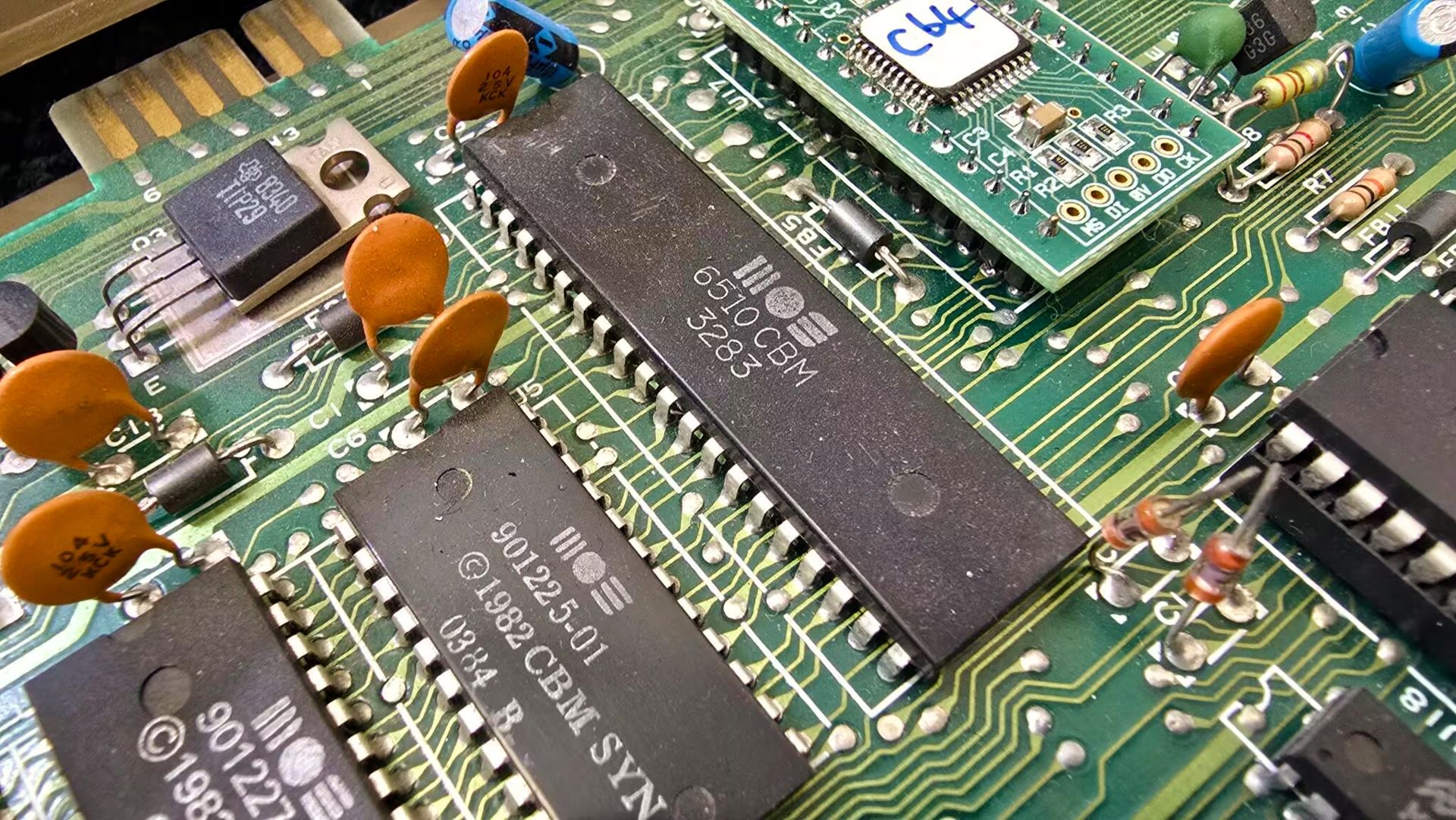
Creating an emulator is a very powerful experience. Not only do you become intimately familiar with the target hardware, but you virtually recreate it with simple keystrokes. Emulators aim to recreate every single component of a piece of hardware down to the electrical timing of a single CPU cycle, not to be confused with simulators, which simply mimic a platform. It’s not always a simple task, but it’s very rewarding when you power it up and are presented with a piece of childhood memory. Sure, there are plenty of emulators out there, but creating your own makes using it and tweaking it so much more fun.
The MOS 6510 is a modified version of the popular MOS 6502. The 6502 was used in systems like the Apple IIe, Atari 800 and 2600, Commodore VIC-20, Nintendo Famicom, and others. The biggest difference with the MOS 6510 is the addition of a general purpose 8-bit I/O port.
I wanted to emulate a Commodore 64... Why? The Commodore 64 was a staple of my childhood. Before graphical OS’es and the internet, there was just imagination and a command prompt. Pair that with some BASIC programming books that my dad left lying around and I felt like I had the world at my fingertips. I wanted to become more familiar with the first computer I ever used. The C64 is simple and complex at the same time, and its internal workings intrigued me.
The MOS 6510 was the CPU that the C64 used. To emulate a full C64 machine, you would also need to emulate the MOS 6581 SID (sound), MOS VIC-II (display), MOS 6526 CIA (interface adapters), I/O and more, but this article focuses on the heart of it all – the CPU. The memory in a C64 is also outlined, because without memory, the CPU can’t do very much.
First off, this article is, as mentioned in the title, a crash course. So, I won’t be going into a lot of detail. It’s more of a primer for those of you who are interested in MOS 6510 emulation, and something to send you off in the right direction.
The basic cycle your emulator will perform will be the following:
Read next instruction from memory at the PC (program counter)
Process instruction
Process Timers on CIA1 and CIA2 (not covered in this article)
Update screen via VIC-II (not covered in this article)
Calculate cycles (for emulators that aren’t cycle-exact)
The last point only applies if you are making an instruction-exact emulator vs. a cycle-exact emulator. Instruction-exact emulation is easier because you simply process an instruction and increment by the number of cycles that instruction is supposed to take, but it is less accurate and may result in some features of the system not working exactly right. Cycle-exact emulation only processes one CPU cycle per loop in your emulator, so one instruction could be performed over multiple loops. That method is very accurate but is more complex to implement as you will need to be more granular in how you process instructions.
The CPU is responsible for processing instructions from memory. It’s an 8-bit processor, which means the registers will store 8 bits each, other than the PC (program counter), which is 16 bits (high and low bytes) so that it can store a memory location.
 Click to read the MOS 6510 data sheet
To emulate the processor, you will need to implement the following components...
Registers are small areas of memory located directly in the processor that have extremely fast access. Each register has a purpose and can be used in various ways depending on the context of an instruction.
PC (program counter)
Stores the active address in memory.
S (stack pointer)
Pointer to current location in stack, which starts at 0x01FF in memory and grows downward to 0x0100
P (processor status)
See status flags below
A (accumulator)
Stores arithmetic and logic results
X (index register)
Used for modifying effective addresses
Y (index register)
Used for modifying effective addresses
The status flags are used in the byte that makes up the P register. They can alter the way certain things behave when set or unset and provide status outcomes for operations.
N (1 – negative flag)
V (2 – overflow flag)
X (4 – unused flag)
B (8 – break flag)
D (16 – decimal mode flag)
I (32 – interrupt disable flag)
Z (64 – zero flag)
C (128 – carry flag)
Addressing modes determine where an instruction finds a value to work with. One instruction can have many variations that use different addressing modes, these are called opcodes.
Implied
Operand is in accumulator, no addressing needed. This is for one byte instructions that operate on the accumulator
Immediate
Operand is at byte after instruction, no addressing needed
Relative
Address at PC +/- value of byte after instruction (interpreted as signed byte). This is used for branching. It basically allows the PC to branch from -128 to 127 bytes from its current position
Zero Page
Address at byte after instruction
Zero Page X
Address at byte after instruction + X register
Zero Page Y
Address at byte after instruction + Y register
Absolute
Address at word after instruction
Absolute X
Address at word after instruction + X register
Absolute Y
Address at word after instruction + Y register
Indirect
Address at memory which is pointed to by word after instruction
Indirect X
Address at memory which is pointed to by word after instruction + X register
Indirect Y
Address at memory which is pointed to by word after instruction + Y register
Click for more information on MOS 6510 addressing modes.
There are too many instructions to list in this crash course, but here is a link to an opcode matrix. It shows the value of each opcode, the associated instruction and addressing mode, as well as the logical function of each.
One of the most important aspects of emulating the CPU is the timing. For my C64 emulator, I used the PAL specification of 0.985 MHz, or 985,000 cycles/second. If you are implementing the NTSC specification, then you would use 1.023 MHz. As I said before, if not implementing cycle-exact emulation, you need to determine how many cycles each instruction takes and increment the cycles that have passed. This is important for determining when certain IRQ’s should be fired as well as the progress of the raster line when implementing the VIC-II. The raster line position will have to match the CPU cycles (screen refresh is 50 Hz on PAL, 60 Hz on NTSC) so that programs which rely on raster line position to create certain graphical effects will work.
Also, keep in mind that certain things take extra cycles. For instance, if an instruction uses Absolute Y addressing and crosses the page boundary in memory, that takes an extra CPU cycle.
The MOS 6510 is a little endian chip. This means that when you are reading a word from memory (16 bits on the MOS 6510), you will need to read in the second address position first, followed by the first address position. You can then use the result to create a 16 bit variable in your programming language of choice. A simple example of this is as follows:
(peek(address + 1) << 8) | peek(address)Where peek() grabs a byte from a memory location. The byte from the second address location is bit shifted 8 positions left and is then bitwise OR’ed with the byte from the first address location.
The C64 has 65,535 bytes of memory, or 64 KB. Bank switching is used to switch the ROM and I/O in and out by changing the latch bits in the first two bytes of memory. A page of memory on the C64 is 256 bytes. The first page is called the Zeropage and is easily addressable with zeropage addressing, which is fast because the C64 is an 8-bit machine.
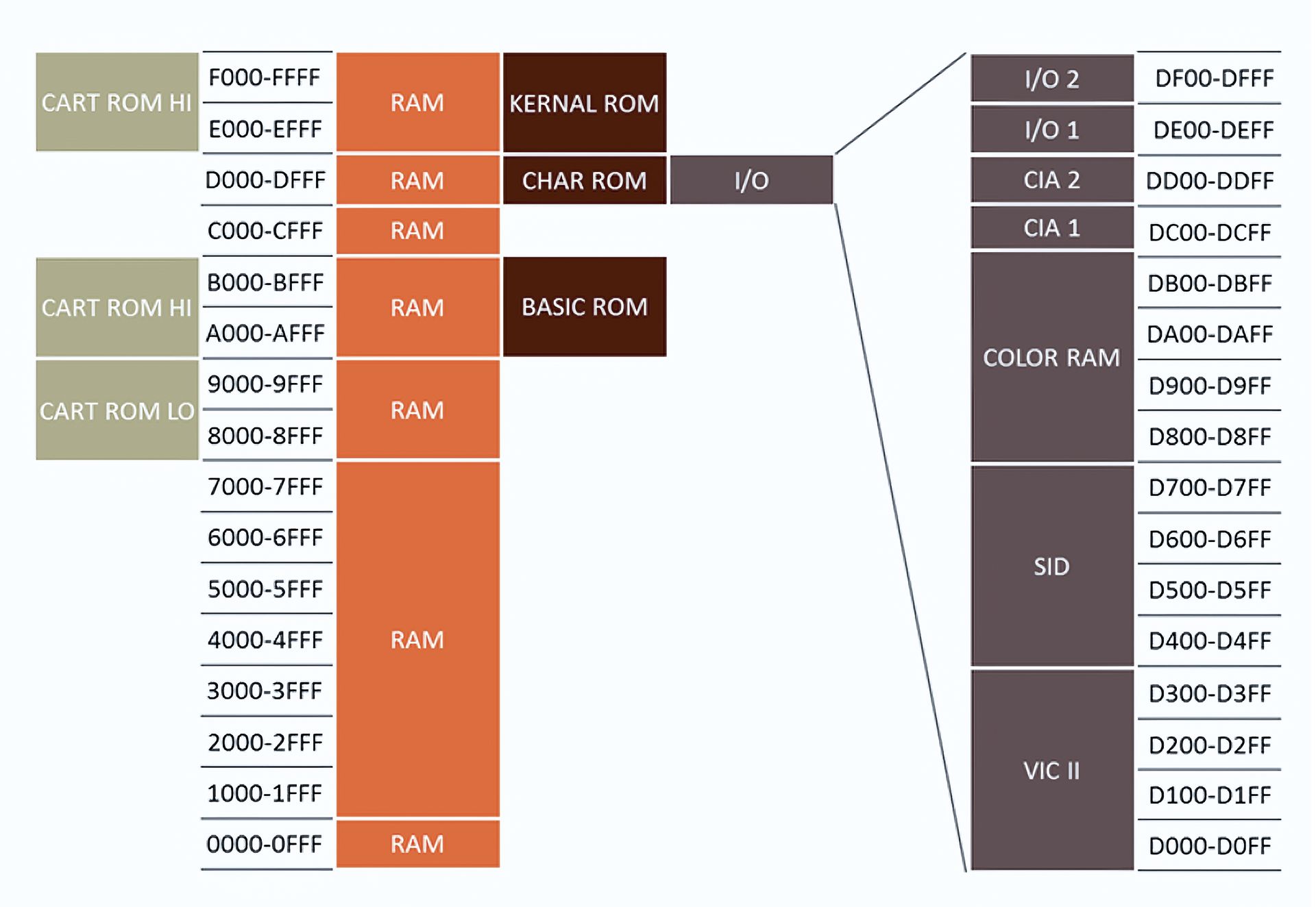
Here is a basic mapping of the C64’s memory:
0x0000-0x00FF: Zeropage – first two bytes contain directional and latch bits that can be set to swap ROM’s and I/O in and out of place.
0x0100-0x01FF: Stack
0x0200-0x03FF: OS
0x0400-0x07FF: Screen
0x0800-0x9FFF: Free RAM for BASIC programs
0xA000-0xBFFF: BASIC ROM or free RAM for machine language programs when ROM switched out
0xC000-0xCFFF: Free RAM for machine language programs
0xD000-0xDFFF: CHAR ROM or I/O or Sprite data, interrupt register, etc. when CHAR ROM and I/O switched out.
0xE000-0xFFFF: KERNEL ROM or free RAM for machine language programs when ROM switched out
When I/O is switched on, the region 0xD000-0xDFFF maps to the following:
0xD000-0xD3FF: VIC-II registers
0xD400-0xD7FF: SID registers
0xD800-0xDBFF: Color memory
0xDC00-0xDCFF: CIA1
0xDD00-0xDDFF: CIA2
0xDE00-0xDEFF: I/O 1
0xDF00-0xDFFF: I/O 2
Click for a more detailed Commodore 64 memory map.
There are two important factors when initializing your emulator – the PC and directional/latch bits in the first two bytes of memory.
The first byte of memory, which contains directional bits, should be initialized to 0xFF. The second byte, which contains the latch bits, should be initialized to 0x07 (00000111). This will enable the KERNEL ROM, BASIC ROM, and I/O. The CHAR ROM and underlying memory of these locations will not be accessible unless the banks are switched.
The PC should be initialized to the word read from memory location 0xFFFC. This will read from the KERNEL ROM due to the latch bits initialization.
That concludes the crash course. Hopefully you’re at least a little more informed about the MOS 6510 than before. The only external pieces you will need to obtain in order to create your emulator are the three ROMs as mentioned above – BASIC, CHAR and KERNEL. These can usually be obtained somewhere online or from another emulator. It’s a lot of work to emulate anything, but it’s a fun project and worth it in the end.
There's usually more to the story so if you have questions or comments about this post let us know!
Do you need a new software development partner for an upcoming project? We would love to work with you! From websites and mobile apps to cloud services and custom software, we can help!

Microsoft announced the general availability of .NET 10, describing it as the most productive, modern, secure, and high-performance version of the platform to date. The release is the result of a year-long effort involving thousands of contributors and includes improvements across the runtime, libraries, languages, tools, frameworks, and workloads. The benefits can be seen even if you only use it as a drop-in replacement for .NET 9.
Some of the key improvements to the framework include:
JIT compiler enhancements: Better inlining, method devirtualization, and improved code generation for struct arguments
Hardware acceleration: AVX10.2 support for cutting-edge Intel silicon, Arm64 SVE for advanced vectorization with Arm64 write-barrier improvements reducing GC pause times by 8-20%
NativeAOT improvements: Smaller, faster ahead-of-time compiled apps
Runtime optimizations: Enhanced loop inversion and stack allocation strategies deliver measurable performance gains
Post-quantum cryptography: Expanded PQC support helps future-proof your applications against quantum threats while maintaining compatibility with existing systems
Enhanced networking: Networking improvements make apps faster and more capable
AI frameworks: Building AI-powered apps in .NET 10 is straightforward, from simple integrations to complex multi-agent systems
In addition to library and package features, C# 14 and F# 10 deliver powerful language improvements that make your code more concise and expressive. C# continues to be one of the world’s most popular programming languages, ranking in the top 5 in the 2025 GitHub Octoverse report.
Related platforms are also being updated to run on .NET 10, like Umbraco CMS version 17. So if you're running a prior version now is the time to upgrade!
There's usually more to the story so if you have questions or comments about this post let us know!
Do you need a new software development partner for an upcoming project? We would love to work with you! From websites and mobile apps to cloud services and custom software, we can help!

Sfumato is a pair of tools that generate CSS for your web-based projects. You can create HTML markup and use pre-defined utility class names to style the rendered markup, without actually writing any CSS code or leaving your HTML editor! The resulting HTML markup is clean, readable, and consistent. And the generated CSS file is tiny, even if it hasn't been minified!
The first tool is the command line interface (CLI), which you can install once and use on any projects. It will watch/build CSS as you work.
The second tool is a Nuget package that you can add to a compatible .NET project. And after adding a snippet of code to your startup, it will build/watch as you run your app or debug, generating CSS on the fly.
 Build complex layouts with simple CSS classes and without writing CSS
Sfumato is compatible with the Tailwind CSS v4 class naming structure so switching between either tool is possible. In addition, Sfumato has the following features:
Cross-platform — Both the Sfumato CLI tool and nuget package work on Windows, Mac, and Linux on x64 and Arm64/Apple Silicon CPUs. They're native, multi-threaded, and lightning fast! So you can build anywhere.
Low overhead — Unlike Tailwind, Sfumato doesn't rely on NodeJS or any other packages or frameworks. Your project path and source repository will not have extra files and folders to manage, and any configuration is stored in your source CSS file.
Dev platform agnostic — The Sfumato CLI works great in just about any web project:
JavaScript frameworks, like React, Angular, etc.
Hybrid mobile projects, like Blazor Hybrid, Flutter, etc.
Content Management Systems (CMS) like WordPress, Umbraco, etc.
Custom web applications built with ASP.NET, PHP, Python, etc.
Basic HTML websites
Works great with ASP.NET — Sfumato supports ASP.NET, Blazor, and other Microsoft stack projects by handling "@@" escapes in razor/cshtml markup files. So you can use arbitrary variants and container utilities like "@container" by escaping them in razor syntax (e.g. "@@container").
In addition to using the CLI tool to build and watch your project files, you can instead add the Sfumato Core Nuget package to your ASP.NET-based project to have Sfumato generate CSS as you debug, or when you build or publish.
Imported CSS files work as-is — Sfumato features can be used in imported CSS files without any modifications. It just works. Tailwind's Node.js pipeline requires additional changes to be made in imported CSS files that use Tailwind features and setup is finicky.
Better dark theme support — Unlike Tailwind, Sfumato allows you to provide "system", "light", and "dark" options in your web app without writing any JavaScript code (other than widget UI code).
Adaptive design baked in — In addition to the standard media breakpoint variants (e.g. sm, md, lg, etc.) Sfumato has adaptive breakpoints that use viewport aspect ratio for better device identification (e.g. mobi, tabp, tabl, desk, etc.).
Integrated form element styles — Sfumato includes form field styles that are class name compatible with the Tailwind forms plugin.
More colorful — The Sfumato color library provides 20 shade steps per color (values of 50-1000 in increments of 50).
More compact CSS — Sfumato combines media queries (like dark theme styles), reducing the size of the generated CSS even without minification.
Workflow-friendly — The Sfumato CLI supports redirected input for use in automation workflows.
There's usually more to the story so if you have questions or comments about this post let us know!
Do you need a new software development partner for an upcoming project? We would love to work with you! From websites and mobile apps to cloud services and custom software, we can help!
DUID is a fully-featured replacement for GUIDs (Globally Unique Identifiers). They are more compact, web-friendly, and provide more entropy than GUIDs. We created this UUID type as a replacement for GUIDs in our projects, improving on several GUID shortcomings when using them as IDs in languages like JavaScript and as URL parameters.
We pronounce it doo-id, but it can also be pronounced like dude, which is by design :)
You can use DUIDs as IDs for user accounts and database records, in JWTs, as unique code entity (e.g. variable) names, and more. They're an ideal replacement for GUIDs that need to be used in web scenarios.
Uses the latest .NET cryptographic random number generator
More entropy than GUID v4 (128 bits vs 122 bits)
No embedded timestamp (reduces predictability and improves strength)
Self-contained; does not use any packages
High performance, with minimal allocations
16 bytes in size; 22 characters as a string
Always starts with a letter (can be used as-is for programming language variable names)
URL-safe
Can be validated, parsed, and compared
Can be created from and converted to byte arrays
UTF-8 encoding support
JSON serialization support
TypeConverter support
Debug support (displays as string in the debugger)
Yes, you can also find DUID on nuget. Look for the package named fynydd.duid.
Similar to Guid.NewGuid(), you can generate a new DUID by calling the static NewDuid() method:
This will produce a new DUID, for example: aZ3x9Kf8LmN2QvW1YbXcDe. There are a ton of overloads and extension methods for converting, validating, parsing, and comparing DUIDs.
Here are some examples:
There is also a JSON converter for System.Text.Json that provides seamless serialization and deserialization of DUIDs:
There's usually more to the story so if you have questions or comments about this post let us know!
Do you need a new software development partner for an upcoming project? We would love to work with you! From websites and mobile apps to cloud services and custom software, we can help!

Picture this: your mission-critical software project is in full swing. Timelines are tight and deliverables are complex. Then, out of nowhere, your lead developer needs extended time off, or perhaps moves on to a new opportunity. On small projects, this is a headache—but on mid to large software projects it can be a full-blown crisis. But you were proactive. You had your software development partner cross-train a backup. Crisis averted.
On larger projects, the complexity of the codebase, the number of integrations, and the coordination required across teams make it essential to have more than one person deeply familiar with its inner workings. A backup developer isn’t just a safety net—they’re a critical part of maintaining project velocity and quality when team members are unavailable. With cross-training there’s always someone who can step up and keep the project moving, ensuring that timelines and business goals are met.
Plus, the benefits extend beyond risk management. Backup developers help foster a culture of collaboration and accountability. When multiple developers understand the system, it encourages better documentation, smarter code reviews, and provides a larger base of technical knowledge. Ultimately, for appropriately sized and mission critical software app and platform projects, investing in a backup developer will protect your investment. It’s peace of mind that your project won’t grind to a halt over a single absence.
Adding one or more backup developers doesn’t have to double your costs or slow down the team. Just be smart about it. Cross-training can be done efficiently by including backup developers in meetings, writing thorough documentation, and pairing them with leads during onboarding and major feature development. This approach ensures knowledge transfer without disrupting velocity or exceeding the budget.
There's usually more to the story so if you have questions or comments about this post let us know!
Do you need a new software development partner for an upcoming project? We would love to work with you! From websites and mobile apps to cloud services and custom software, we can help!